
Quick answer: Every gaming laptop brand offers the same three kinds of mode under different names: a quiet mode that limits power and fan noise, a middle mode for everyday use, and a fast mode that raises CPU and GPU power with louder fans. For games, plug the charger in and use the middle or fast mode, since ASUS, Lenovo and Acer all restrict their top modes on battery. ASUS’s own advice is that when in doubt, its middle Performance mode is the one to pick, and Turbo is for when noise does not matter.
Mode names and descriptions checked against ASUS, Lenovo, MSI, Acer, HP, Gigabyte and Dell documentation, November 2026.
What a performance mode changes
Lenovo’s Legion user guide puts it plainly: each mode sets the maximum performance, power consumption and fan speed limit. A faster mode lets the CPU and GPU draw more power, which produces more heat, which the fans have to remove. ASUS’s operating modes guide makes the same point about Turbo, which raises CPU and GPU wattage rather than just turning the fans up.
How the mode names match up
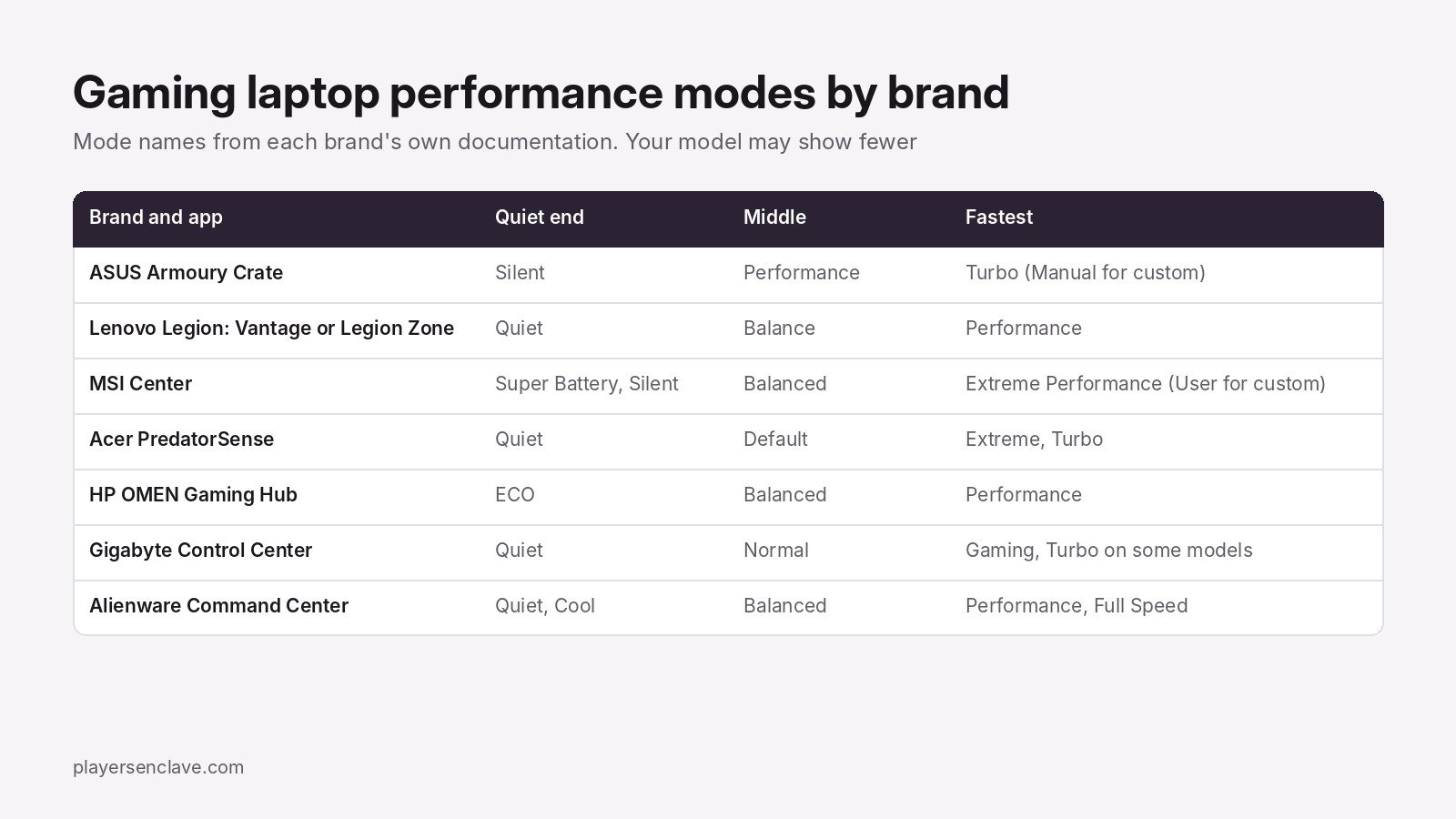
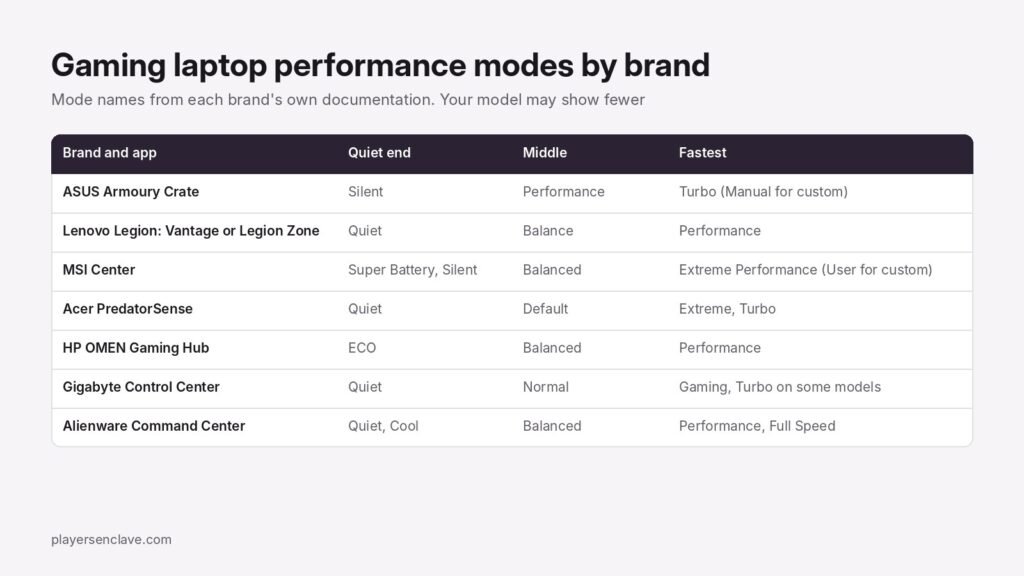
- ASUS: Silent limits CPU and GPU power and keeps noise to usually about 35dBA depending on the model. Performance balances power, heat and noise. Turbo adds ROG Boost and more wattage. Manual lets you set fan curves and power targets. Windows mode follows the Windows power plan.
- Lenovo Legion: Quiet, Balance and Performance, switched with Fn + Q or in Lenovo Vantage or Legion Zone. Balance switches between the other two automatically depending on the task.
- MSI: MSI Center’s User Scenario offers Extreme Performance for demanding games, Balanced, Silent to lower fan noise, Super Battery to cut power use, and User mode to set the performance level and fan speed yourself.
- Acer Predator: Acer’s Predator Helios 300 user manual lists Quiet, Default, Extreme (“CPU & GPU overclocked with throttled fan speed”) and Turbo (“maximize overclock performance and fan speed”).
- HP OMEN: HP’s OMEN Gaming Hub guide lists Balanced, Performance and ECO, and says Performance mode can raise temperatures by 3 to 5°C in intensive gaming. On the 2025 OMEN 16, HP says Unleashed Mode raises power limits up to 170W.
- Gigabyte: Normal, Gaming and Quiet fan profiles, plus Turbo on some models, which Gigabyte says runs the CPU and GPU at their highest frequency with the fans at full speed. Our Gigabyte fan modes guide covers each one.
- Alienware: Dell’s m15 R6 guide lists Full Speed, Performance, Balanced, Cool and Quiet, and notes that Cool mode limits GPU performance.
Why the fastest mode needs the charger
Three brands say so directly. ASUS says Turbo may be unavailable on battery or with a USB-C adapter and needs the full included adapter plugged into the wall. Lenovo says you may not be able to switch to Performance on battery or with an under-rated adapter. Acer’s manual says Predator mode switching only works with the adapter plugged in and at least 40% battery left. If your fastest mode is greyed out, check the charger first. If games run poorly even when plugged in, see our guide to a laptop not using its dedicated GPU.
Which mode should you use?
| What you are doing | Mode to pick |
|---|---|
| Browsing, video, office work on battery | The quiet mode: Silent, Quiet, ECO or Super Battery |
| Mixed use, plugged in | The middle mode: Performance on ASUS, Balance or Balanced elsewhere |
| Gaming, plugged in | Performance on ASUS, or the fast mode on other brands |
| Maximum frame rates, noise does not matter | Turbo, Extreme Performance or Full Speed |
| Fine control over fans and power | Manual, User or Deep Control |
One warning on custom modes: ASUS notes that pairing high wattage with low fan speeds in Manual mode can cause throttling, so raise fan speeds along with power.
Mode missing or the app will not open?
Some models simply lack a mode: an HP employee confirmed in HP’s community that some Victus laptops have no Performance mode, as we cover in our OMEN Gaming Hub guide. If the control app itself is broken, use our fixes for Armoury Crate, MSI Center, NitroSense, Gigabyte Control Center and Alienware Command Center. For what sustained heat does over the years, read our guide to gaming laptop thermal degradation.
Photo by K. on Pexels, free to use under the Pexels License. Diagram: PlayersEnclave.