
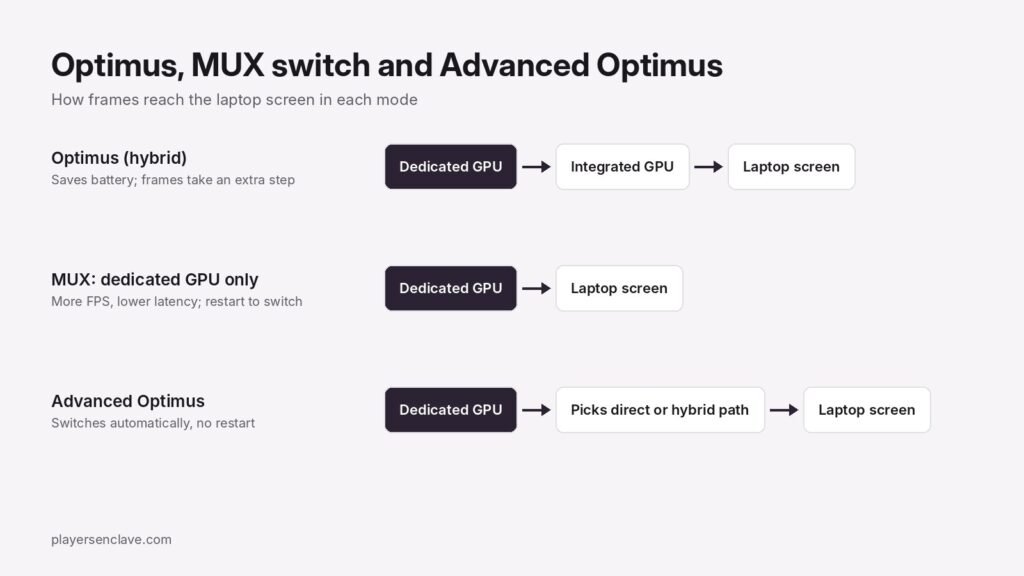
Quick answer: A MUX switch is a chip that lets the dedicated GPU send frames straight to the laptop screen instead of through the integrated graphics. ASUS measured an average gain of about 9% with it turned on, and Acer puts the typical gain at 5 to 15%, with lower input lag. The catch is battery life and, on most laptops, a restart every time you switch. NVIDIA Advanced Optimus does the switching automatically without a restart.
Checked against ASUS’s MUX switch guide, Acer’s MUX switch article and Dell’s Alienware Command Center support notes, November 2026.
Optimus, MUX and Advanced Optimus
- Optimus (hybrid): the standard Windows setup. ASUS explains that Windows routes frames through the integrated graphics and switches the dedicated GPU on and off as needed, which saves battery.
- MUX switch, dedicated GPU only: the dedicated GPU drives the screen directly. ASUS describes this as the best possible latency and performance for competitive games, and Acer notes it also enables G-SYNC on the built-in screen on many laptops.
- Advanced Optimus: switches between the direct path and the hybrid path automatically, with no restart. ASUS says it works when the laptop is plugged into a wall socket.
How much faster is it?
ASUS reported an average gain of 9% in its own testing, with Rainbow Six Siege gaining more than 30%. Acer says the gain is typically 5 to 15% plus reduced input lag. Results depend on the game, so treat these as the brands’ own figures rather than a guarantee for your laptop. The cost is power: ASUS notes that its Ultimate mode draws more power and gives up some battery life.
How to turn it on
| Brand | Where to switch | Restart needed? |
|---|---|---|
| ASUS ROG and TUF | Armoury Crate, GPU Mode: choose Ultimate | Yes |
| Acer Predator and Nitro | PredatorSense or NitroSense settings: Discrete GPU only. Or BIOS (F2), Advanced tab, Display Mode | Yes |
| Laptops with Advanced Optimus | NVIDIA Control Panel, Display, Manage Display Mode | No |
ASUS’s GPU Mode also offers Standard (the Windows default), Eco, which turns the dedicated GPU off for maximum battery life, and Optimized, which uses Eco on battery and Standard when plugged in. On a Dell G16 7630, Dell’s own support notes list the NVIDIA Control Panel options as Optimus, NVIDIA GPU only and Automatic Select.
Does your laptop have one?
- Look for a GPU mode or display mode setting in your brand’s control app. On Acer, Acer says that if “Discrete GPU only” does not appear after updating the app and BIOS, the model likely has no MUX switch.
- Check the BIOS for a Display Mode option, as Acer suggests.
- Check the spec sheet. Acer, for example, lists a MUX switch on the Nitro V 16 AI, as covered in our Acer brand guide.
When to use each mode
- Gaming plugged in: dedicated GPU only, or Advanced Optimus if you have it.
- Working or watching on battery: hybrid or Eco mode, to save power.
If games still run on the wrong GPU, see our guide to a laptop not using its dedicated GPU. For why performance falls when unplugged, see why FPS drops on battery, and if a mode will not change on an Alienware or Dell G16, our Alienware Command Center fixes cover Dell’s workaround.
Photo by Back2Gaming on Unsplash, used under the Unsplash License. Diagram: PlayersEnclave.