
Quick answer: Gigabyte covers its laptops against manufacturing defects for a limited period that depends on your region and seller, with the battery covered for one year and dead pixels covered for only the first 30 days. You start a claim online with Gigabyte, pay to ship the laptop in, and track the repair with an RMA number. Register the laptop with your receipt first, because Gigabyte says some warranty services may not be available without registration.
Gigabyte’s laptops are strong on hardware value, as we cover in our guide to whether Gigabyte is a good laptop brand, but after-sales support is where the brand gets criticised most. Knowing exactly what the warranty says before something breaks saves weeks later.
Terms checked against Gigabyte’s US and UK laptop warranty pages, October 2026.
How long is the Gigabyte laptop warranty?
Gigabyte’s current warranty pages do not print one number for every laptop. The UK page tells buyers to “confirm the detail and scope of the warranty service with the dealer”, and the global page says terms follow “the local authorized items of each country”. In practice that means your warranty length is the one stated on your product listing, box or invoice.
For the US, Laptop Mag’s 2022 support test reported a one-year limited warranty on Gigabyte and Aorus laptops and their AC adapters, starting from the date of purchase rather than the date of delivery. Two parts have fixed terms everywhere:
- Battery: one year from purchase. Gigabyte’s UK page adds that normal capacity loss from charge cycles is not a defect.
- Dead or stuck pixels: covered for 30 days only. After that, pixel faults are handled as paid, out-of-warranty repairs.
Gigabyte laptop warranty at a glance
| Term | What Gigabyte says |
|---|---|
| Warranty start | Date of purchase, proven by a receipt or invoice showing the date and dealer name |
| Battery | 1 year; normal wear from charge cycles excluded |
| Defective pixels | 30 days; US page lists limits of 2 bright dots, 3 dark dots, 5 in total |
| Registration | Strongly advised; some services may be unavailable without it |
| Shipping to Gigabyte | Paid by you; Gigabyte is not responsible for transit damage |
| International repairs | Global warranty, but repairs use local parts and you pay shipping and taxes |
| Data | Not Gigabyte’s responsibility; back up before sending |
| Voids coverage | Missing serial sticker, unauthorized repairs, customer damage, non-approved parts |
What does the warranty not cover?
According to Gigabyte’s US laptop warranty page, these are excluded:
- Accidents, drops, liquid damage, natural disasters and any damage Gigabyte decides was caused by the owner
- Components that are not on Gigabyte’s approved parts list (QVL)
- Used, open-box and refurbished units, unless Gigabyte says otherwise
- Accessories such as bags, manuals and promotional items
- Third-party extended warranties, which are the seller’s responsibility
The serial-number sticker matters more than most owners realise. Gigabyte states that the global warranty is void if the sticker is missing, and the UK page adds that it must also be readable. Do not peel it off when cleaning or repasting.
Does upgrading the RAM or SSD void the warranty?
Gigabyte’s pages do not say that opening the laptop to upgrade memory or storage automatically voids the warranty. They do exclude non-approved components, unauthorized repairs and damage Gigabyte attributes to the owner. The safe approach is to buy parts listed on your model’s QVL, keep the original modules, and put them back before sending the laptop in. The UK page also notes that Gigabyte repairs the complete system only, so it will not service a single SSD or memory stick separately.
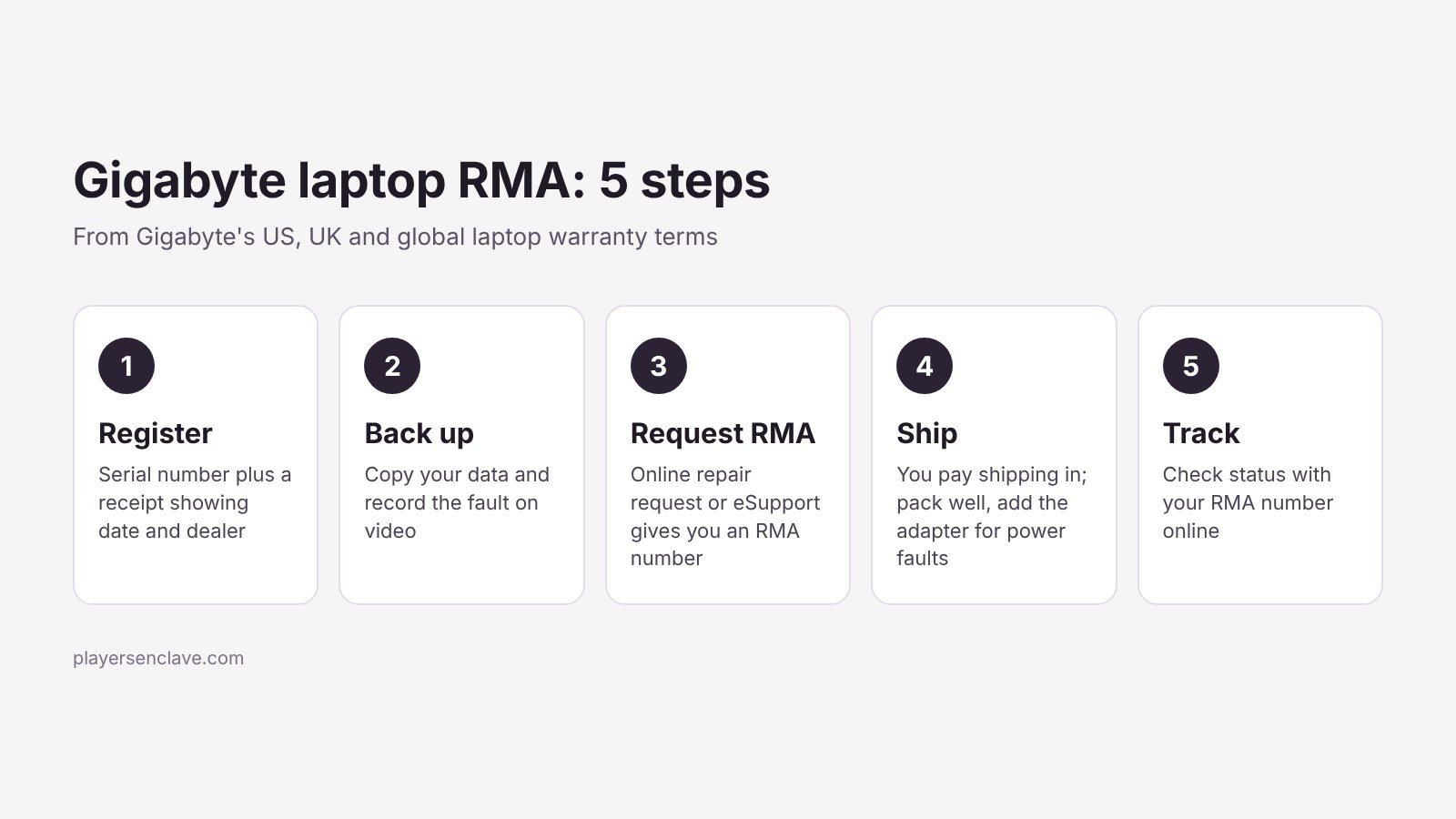
How do you file a Gigabyte laptop RMA?
- Register the laptop. Create a Gigabyte member account and register the serial number with a photo or scan of your receipt.
- Back up and record the fault. Copy your files off the drive and record the problem on video or in photos, especially intermittent faults and screen defects.
- Request the repair online. Submit the request through Gigabyte’s online repair service or its eSupport system. You receive an RMA number.
- Ship it properly packed. Use the original box or equivalent protection. Include the AC adapter if the fault involves charging or power.
- Track the repair. Use your RMA number on Gigabyte’s repair tracking page.
How long does a Gigabyte laptop repair take?
Gigabyte does not publish a turnaround time. Its own wording is that repairs happen as soon as possible, depending on local parts availability, and that some parts must be shipped in. Owner reports show why that matters: in one widely read Tom’s Guide forum thread, a US laptop waited 43 days at the repair centre for a motherboard from Taiwan. That case is from 2016, but waiting on parts is still the delay Gigabyte’s own terms warn about.
Reaching support can also be slow. In Laptop Mag’s 2022 test, phone calls waited between 47 minutes and nearly an hour and a half, and the web support answer took 14 days, earning Gigabyte 30 out of 100. Use the online repair request rather than relying on the phone line.
Should you go to the retailer or to Gigabyte?
- Within the retailer’s return window: a return or exchange is usually faster than an RMA.
- In the UK: the retailer is legally responsible for faulty goods under the Consumer Rights Act, including a 30-day right to reject, separately from Gigabyte’s warranty. This summary of the Act covers the key time limits.
- Bought abroad: the global warranty applies, but the repair centre fits local parts. Gigabyte’s own example is a US repair fitting an English keyboard to a laptop that shipped with a Chinese one.
Before you buy: what this means for you
The written terms are straightforward. The weak points are the short 30-day pixel window, slow support channels and repairs that can stall while parts are shipped in. Check the screen carefully in the first month, keep your receipt and serial sticker safe, and buy from a retailer with a good returns policy. If you want to reduce the odds of needing a repair at all, our guide to making a gaming laptop last covers the habits that matter, and our look at Gigabyte’s reliability and Aorus quality control covers the faults owners report most.
Photo: Pexels, free to use under the Pexels License. Diagram: PlayersEnclave.